If you need to transfer the save file to another friend or PC and you are not using a dedicated server you can follow this guide and hopefully it’ll solve your problems. It took a few trials and errors but it worked for me and my friend and I thought someone else could use the info and not waste time trying to understand this game’s weird saving logic.
Introduction
Feel free to backup your worlds but this method only involves copying an additional save folder so no harm should be done, theoretically!
The Files You Need
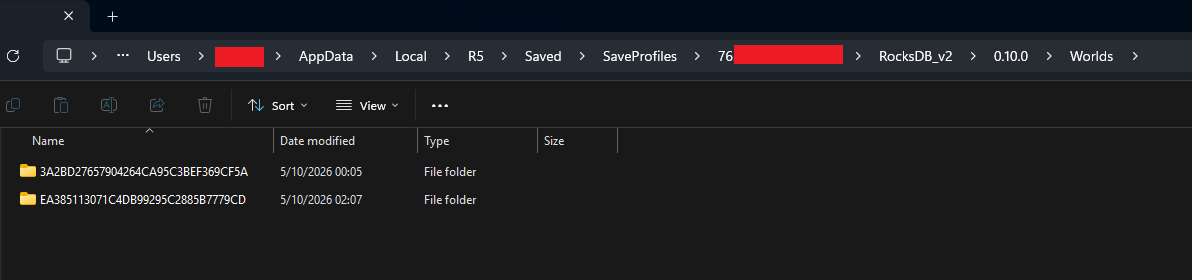
- %LOCALAPPDATA%\R5\Saved\SaveProfiles\[FriendSteamID]\RocksDB_v2\0.10.0\Worlds\[ToBeTransferredWorldID]
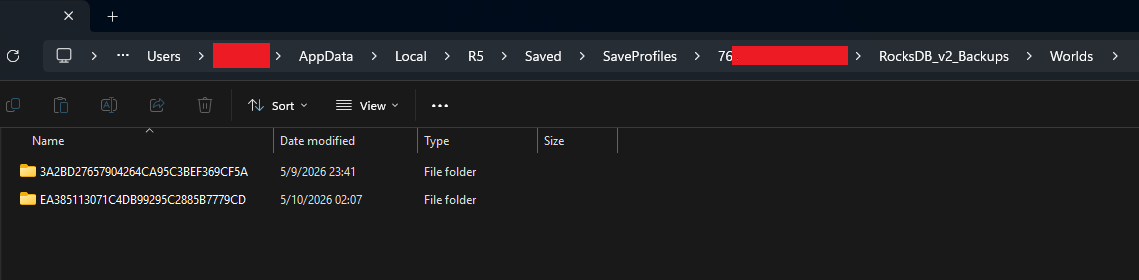
- %LOCALAPPDATA%\R5\Saved\SaveProfiles\[FriendSteamID]\RocksDB_v2_Backups\Worlds\[ToBeTransferredWorldID]
[FriendSteamID] => This is a long number, it changes per user
[ToBeTransferredWorldID] => This is the id of the world. If your friend has multiple worlds, they can check the world id in game by hovering over the world selection panel when trying to continue the game.
IMPORTANT!!! You need the backup world as well. If you don’t have it you will not see the world in the game. The game seems to be cross checking the backup and the world save against each other and if there is a discrepancy between save files, the save file gets reverted back to the backup. I’ve learned it the hard way.
Placement
- %LOCALAPPDATA%\R5\Saved\SaveProfiles\[YourSteamID]\RocksDB_v2\0.10.0\Worlds\[TransferredWorldID]
- %LOCALAPPDATA%\R5\Saved\SaveProfiles\[YourSteamID]\RocksDB_v2_Backups\Worlds\[TransferredWorldID]
Extra Notes
To keep your gear and stats, ensure your own Players and Accounts folders remain in place. DO NOT TOUCH Profiles or Accounts folders. If other friends join, their data is already inside the world database, so they should spawn with their items as long as they are using the same Steam accounts.
Before launching for the first time, DISABLE Steam Cloud for Windrose. If you don’t, Steam might see the “new” files as a conflict and overwrite them with empty data from the cloud.
Success!
Keep Arring Matey!!