A guide to getting started in the game
Getting Started
If you get stuck when entering the game for the first time, open the menu with Esc and select Reset Position.

You will be moved to another random location on the map, or to the bed where you last slept.
You can ask other players questions in the in-game chat. If anyone is online, they will be happy to help. You can copy a chat message by left-clicking it; the message will be placed on the clipboard.
You will be moved to another random location on the map, or to the bed where you last slept.
You can ask other players questions in the in-game chat. If anyone is online, they will be happy to help. You can copy a chat message by left-clicking it; the message will be placed on the clipboard.
Technologies

First, select a technology to research. Research continues even while you are away from the game. You can use Brains to speed it up. Brains have a 5% chance to drop from mobs and can be found where a mob died. While Brains are active, technologies are researched twice as fast.
You can also use Technology Boosters. Each booster advances research by one hour. Boosters can be obtained in several ways:
• They have a 1 in 1,500 chance to drop while crafting or gathering resources.
• They have a 1 in 1,000 chance to drop from mobs.
• They can be obtained by exchanging blueprints created at the Blueprint Table.
• At the end of each in-game month, the top six players in the Elimination ranking receive boosters: 1st place gets 24, 2nd gets 20, 3rd gets 16, 4th gets 12, 5th gets 8, and 6th gets 4. The ranking is reset after rewards are issued. The 7th-place score is also reset, but no reward is given.
• They have a 20% chance to be found in meteorites.
• They can appear as floating objects in space in the starting star system and can be collected by ships equipped with an item collector.
Technologies have levels 0, 1, 2, 3, and so on. To unlock the next level, you must research every technology in the current level. Experienced players recommend progressing to steel as quickly as possible.
Your First Tools
Before you have any tools, you can obtain your first wood from bushes. After collecting your first wood, you will need a workbench. Open the crafting menu with C. To place the workbench, select it in your inventory and click Use, then right-click an empty tile. After that, you can open the crafting menu by right-clicking the workbench. The workbench unlocks higher-tier technologies and tools. Once you have tools, use an axe to gather wood, a pickaxe to mine stone and ores, and a pump to extract oil. Some resources are found only on other planets, so do not delay researching space technologies.
Navigator
You can find information about any item in the Navigator.

Enter the item’s name or select it from the list to learn where it can be gathered or crafted and which materials are required to make it.
You can also view item information by right-clicking the item. Its lifetime is shown in real time in the format Days:Hours:Minutes.
Enter the item’s name or select it from the list to learn where it can be gathered or crafted and which materials are required to make it.
You can also view item information by right-clicking the item. Its lifetime is shown in real time in the format Days:Hours:Minutes.
Private Territory

When your character reaches level 2, you can establish a private territory where you may build equipment, storage, and other structures. Its area is 8 by 8 tiles. Your first private territory is free. It disappears if you stay out of the game for a number of days equal to your level. For example, at level 10, the private territory will be cleared after 10 days if you do not log in during that time.
You can place a bed on your private territory and respawn there after dying. Different beds restore energy at different rates:
• Bed: restores 540 energy per hour.
• Comfortable Bed: restores 720 energy per hour.
• Titanium Bed: restores 900 energy per hour.
• Tungsten Bed: restores 1,080 energy per hour.
Blueprint Table

The Blueprint Table can be crafted from wood at a workbench. Creating blueprints requires paper, which is also made from wood at the workbench. Paper has a 50% chance to produce a white blueprint. You can move it to your inventory or continue trying for a more advanced blueprint, but the chance decreases at each step: yellow has a 40% chance, green 30%, blue 20%, red 10%, and black 5%.
In your inventory, blueprints can be exchanged for Technology Boosters by clicking Use:
• 250 white blueprints = 1 booster
• 100 yellow blueprints = 1 booster
• 25 green blueprints = 1 booster
• 5 blue blueprints = 1 booster
• 1 red blueprint = 4 boosters
• 1 black blueprint = 100 boosters
In Game Time
• 1 in-game day equals 1 hour of real time.
• 1 in-game month equals 25 hours of real time.
• 1 in-game year equals 300 hours of real time, or 12.5 days.
• The in-game time is shown at the top of the screen.

• 1 in-game month equals 25 hours of real time.
• 1 in-game year equals 300 hours of real time, or 12.5 days.
• The in-game time is shown at the top of the screen.
Leveling Up

You gain experience and levels by performing various actions. Each new level allows you to improve your skills. What you upgrade first depends on your playstyle. If you plan to focus on crafting, it is recommended that you upgrade Energy first, because it continues to recover while you are away from the game. Energy can also be restored with cigarettes, energy mixtures, meals, and potions. More advanced beds restore Energy faster. If you plan to hunt mobs, it is recommended that you upgrade Health and Accuracy first.
Farming
You can plant a garden on your private territory or on neutral land. On neutral land, other players can dig up your plants, and plant-wilting rules also apply: a mature plant cannot have more than two neighboring plants, or it will die. Follow the correct planting pattern to prevent plants from dying on neutral land. You will need seeds to create a garden. Seeds can be found in underground inventories, which you open by equipping a shovel and right-clicking near your character. Seeds spawn within a radius of three tiles around fully mature plants, so potato seeds should be searched for near mature potato plants. Before planting, till the soil with a hoe, then equip the seeds and right-click to plant them.
Cooking
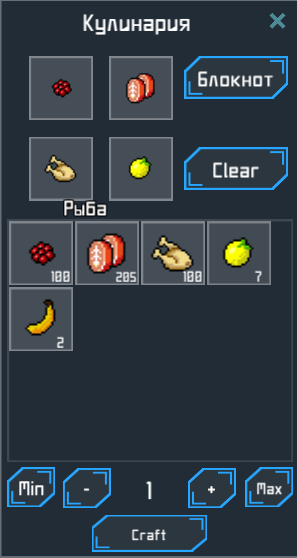
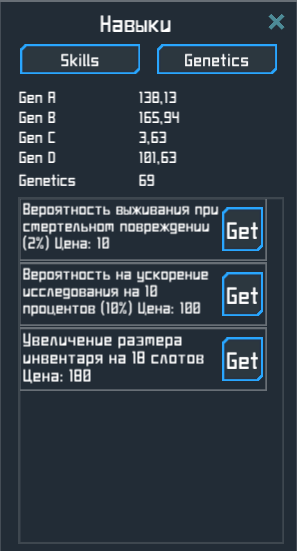
After researching the Cooking Table, you will be able to prepare meals. Combining four ingredients at the Cooking Table produces a meal with a particular food value and set of genes. It is best to find a meal that grants all four genes. Eating meals increases your character’s genes. When all four genes reach 10, you receive one Genetics Point. Genetics Points can be spent on perks such as additional inventory space, a higher critical-hit chance, and automatic use of food, first-aid kits, energy drinks, and more.
Meal recipes on the server are refreshed every in-game year, so you will need to discover them again.
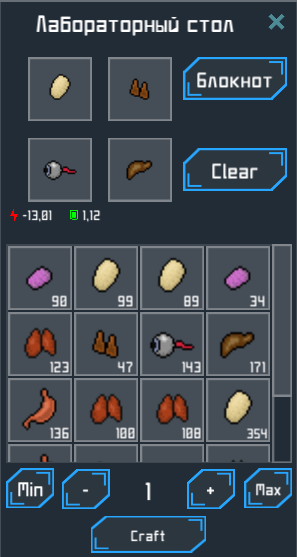
Potions
Like the Cooking Table, the Laboratory Table lets you combine four ingredients to create potions with different effects. These effects can immediately or temporarily improve or reduce your character’s attributes. Ingredients include mob drops such as eyes, livers, ears, stomachs, meat, bones, hides, and other body parts. Potions can affect Health, Energy, Accuracy, movement speed, action speed, melee damage, ranged damage, Defense, melee attack speed, and ranged attack speed.