
Check out this list of all frequently asked questions.
Frequently Asked Question(s)
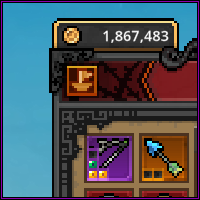 So you finally found a rare item you wish to sell for more than just monopoly money. Be sure to check if it’s really of any worth to do so as generally only items of Immortal+ rarity tend to be. Legendary items may sell for a few cents if one cares enough for it but otherwise I’d advise checking the marketplace to get a better grasp on it. If nothing else, there’s also another guide by d3rlord3 that goes more deeper into the entire aspect of it as I will not and only explain how to. Be sure to check and read his guide out in the link below!
As you see on the right hand side, there is an icon bearing the symbol of a ship at the top left of your main TBH window. Hovering over it reveals it’s the “SteamTradeShip” commandeered by no other than GabeN himself.. “probably”. Clicking on it will bring you to the next following window:
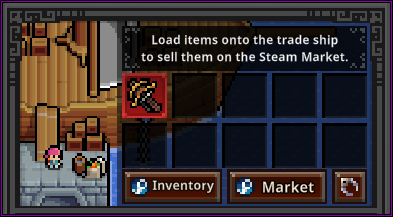 ⚓ Loading the ship.
Drag any items you want to put up for trade from your inventory below this window to the ship (this may take a second or three as it loads it onto your Steam Inventory). After that simply go to your Steam Inventory, either manually or by clicking the Inventory button with the Steam logo in the picture which will redirect you to the same place.
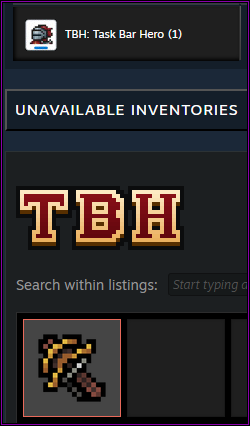
From your Steam inventory, look in the right tab of Task Bar Hero, find your item and click on “Sell” to set a price after which the listing will need your official confirmation through the Steam App/Guard. If you have properly set this up before, there should be no trade delay. If you have not, then you might have to look further into it on Steam to resolve it unfortunately.
Clicking on the “Market” button on the Steam Trade Ship will just direct you to the Marketplace where you can view what is already listed there and perhaps get a better grasp of the pricing range for certain items/rarities.
Any items listed for sale will no longer appear in-game until you de-list them and have them present in your Steam Inventory again. Though they will not appear again on the ship but elsewhere; more on this in the next section.
You have come to the point where you realized your item is not selling for it’s set price and wish to adjust it. Maybe it wasn’t even worth the listing and you wish to retrieve it? ..or did you finally cave in and bought some exotics from the merchants in the far east.
Either way, easiest way to find your listed item is through going to “Community” on the top left of your Steam Window and click on “Market” to find your active listings. Or you can also look up the specific item on the marketplace if you remember the name and type and cancel the listing from there. If you did so, then the item will reappear in your Steam Inventory as shown on the right side and as it was before you listed it. Needless to say if you wish to change the price, just click on “Sell” again and do exactly that.
 If you however wish to retrieve your item back into the game or claim any other bought items, make sure they are present in the Steam inventory and go in-game. But now instead of going to the Steam Trade Ship, go your mailbox instead by clicking the mail icon in your top right main TBH window (as shown on the left).
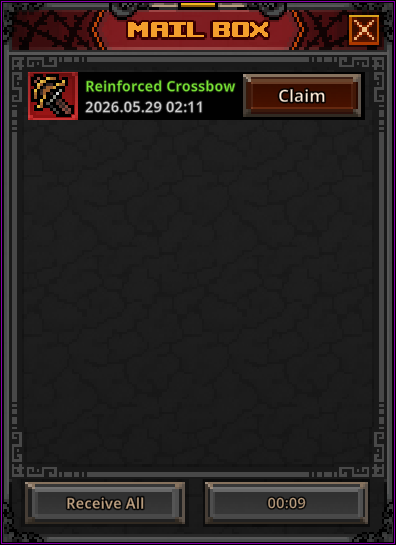 Your mailbox will be on a 10 second cooldown every time you enter or refresh it. Simply wait out the timer and hit the refresh button. And hurrah~ any bought or delisted items will popup here for you to claim/reclaim.
Few things to note here.
🔆 If you haven’t listed an item yet it will remain on the ship. The ship only carries it away out of the game once listed after which it can only be delisted and reclaimed through the mailbox.
🔆 Gear pieces have to be stripped of any slotted decorations/engravings/inscriptions and only be sold in their natural variant and base traits. Most likely to do with Steam’s own itemization and having various different slotted materials would divide the items way too much. The claw icon on the ship window redirects you to the Cube’s removal feature.
🔆 Bought items can’t be instantly re-sold which comes from Steam’s own rulings to discourage quick resale tactics. But if you happen to find something for dirt cheap and find it’s still worth more after the 7 day grace period, then good on you~!
🔆 Caveat emptor on anything you do decide to buy from the marketplace. There are still remainders of items listed from illegitimate players that haven’t been banned yet. What this means I will leave up for interpretations as it enters questionable/exploit territory but if you have gotten a grasp on the game so far, you may be able to fill in the blanks here for yourself.