
This guide will show you how to easily add FSR to the game using OptiScaler.
1. Download OptiScaler
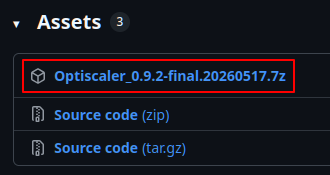
Download OptiScaler[github.com] from GitHub by clicking the first file at the bottom of the page.
It doesn’t have to be the same version as in the screenshot.
It doesn’t have to be the same version as in the screenshot.
2. Extract the files to the game directory
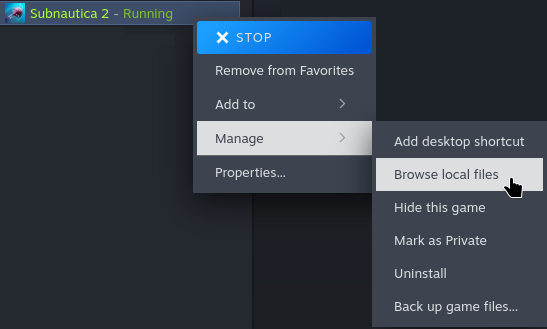
1. Go to your Subnautica 2 game directory by right clicking the game in your Steam library and selecting Browse local files in the Manage tab.
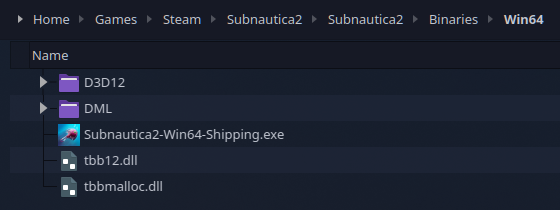
2. From that folder go to Subnautica2/Binaries/Win64 which should look like this:
3. Extract the OptiScaler file you downloaded and its contents into that directory.
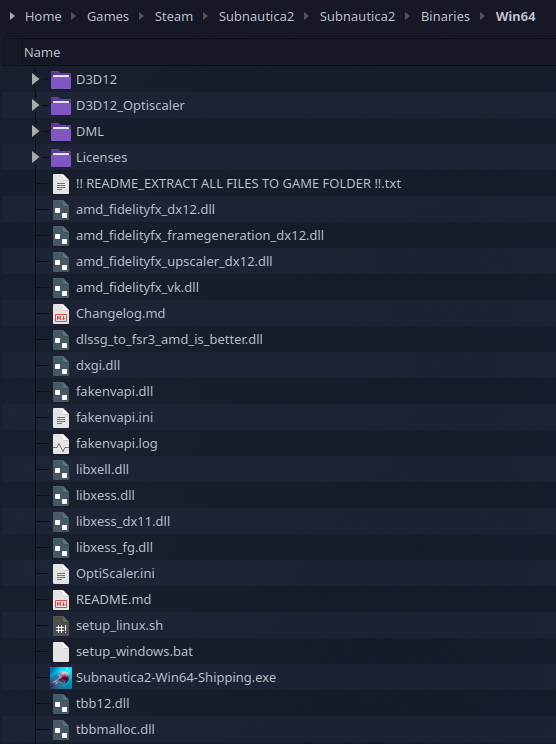
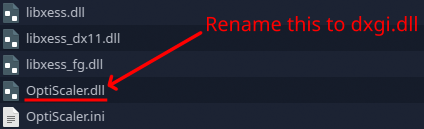
Now the folder should look something like this:
4. Rename OptiScaler.dll to dxgi.dll
2. From that folder go to Subnautica2/Binaries/Win64 which should look like this:
3. Extract the OptiScaler file you downloaded and its contents into that directory.
Now the folder should look something like this:
4. Rename OptiScaler.dll to dxgi.dll
3. Open Subnautica 2 and set the upscaling to DLSS
You should now have DLSS available as an option for upscaling.
While the text says DLSS, it’s actually using FSR for the upscaling method.

NOTE: For Linux users you will need to add “WINEDLLOVERRIDES=”dxgi=n,b” %command%” to the game’s launch options.
While the text says DLSS, it’s actually using FSR for the upscaling method.
NOTE: For Linux users you will need to add “WINEDLLOVERRIDES=”dxgi=n,b” %command%” to the game’s launch options.